Prerequisites
Before you start, you’ll need to install Tatara. If you haven’t yet, you can get set up by following the instructions in the installation guide.Grokking an Eval
An Eval is a function that takes in a dataset, which contains a model’s outputs, and a function to evaluate that dataset. The Eval gives you a score for the model’s outputs. The score can be an int, float, bool, or categorical value (string). All Evals are instances of the Eval class.Writing an Eval
Let’s start by making the necessary imports and by creating an OpenAI client, which we’ll use to call GPT-3.5, who will be responsible for our Eval.run_evals.
If you run this code, it will print the results of the eval to the console and you’ll see something like this:
The dataset will need to be created before running the evals. You can do this using
the
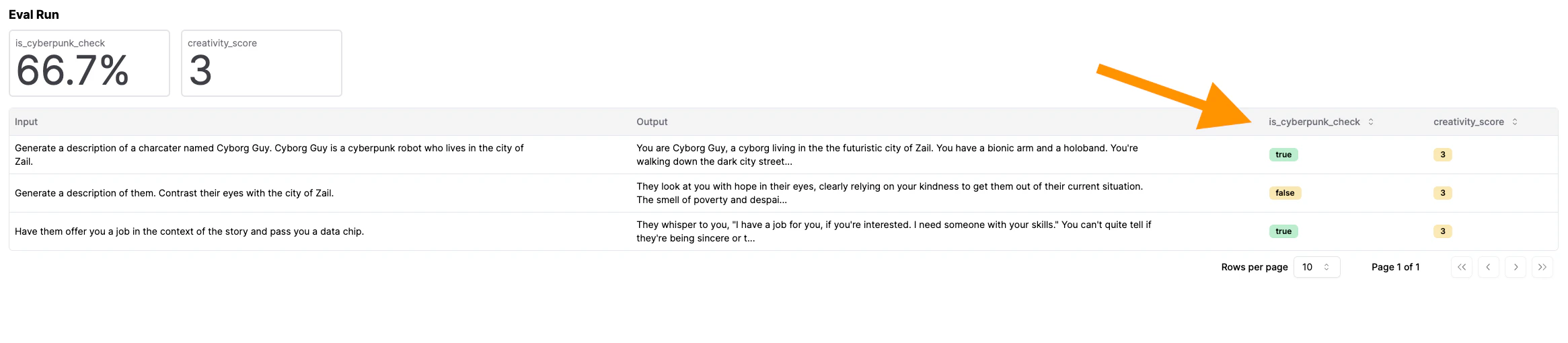
init_dataset function, which you can import with from tatara.datasets import init_datasetViewing the Results
Oncerun_evals is done running, you’ll be able to view the results in the console. To send them to Tatara, remove print_only=True in the run_evals call above. Once you run the code again, head over to the Tatara UI to view your Eval run.